
Download Weight Companion APK – weight tracker, BMI calculator, waist-to-hip ratio, health monitoring, fitness tracking, body measurements, digital scale integration, Android app, free health tool, weight loss app
Overview
Weight Companion is a free Android application developed by Medando, designed to support users in monitoring key health metrics related to body composition and overall wellness. The app enables individuals to record and track their weight, waist circumference, and hip circumference over time, providing a structured way to visualize progress toward personal health and fitness goals. It is particularly suited for individuals managing weight loss, fitness regimens, or general health monitoring who benefit from consistent data tracking.
By storing historical values, the app allows users to analyze trends and identify changes in their body metrics, which can inform lifestyle or dietary adjustments. The tool also calculates important health indicators such as Body Mass Index (BMI), Waist-to-Hip Ratio (WHR), and Waist-to-Height Ratio (WHtR), offering immediate insights into health status. Its integration with digital scales—where available—enhances convenience by enabling automatic data import, reducing manual entry errors.
The app is accessible on Android smartphones and tablets, making it a portable health companion for daily use. It is ideal for users seeking a simple, reliable, and free solution to maintain a consistent record of their physical health data.
Key Features & Capabilities
- Weight and Body Measurement Tracking – Users can log weight, waist, and hip measurements over time to monitor physical changes and progress.
- Health Metric Calculations – Automatic computation of BMI, WHR, and WHtR based on entered data, providing immediate health insights.
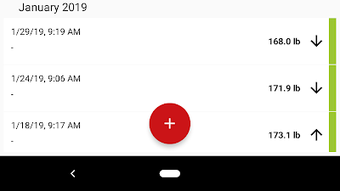
- Historical Data Visualization – Stores and displays past entries to help users identify long-term trends and patterns in their body metrics.
- Digital Scale Integration – Allows import of measurement data from connected digital scales, streamlining the tracking process.
- Data Sharing Functionality – Enables users to share their current and historical data with healthcare providers, trainers, or personal contacts for consultation or feedback.
These features support real-world use cases such as tracking weight loss progress, monitoring changes during fitness programs, or presenting data to medical professionals during health check-ups. The app’s simplicity ensures that users can begin tracking immediately without technical barriers. The integration of automated calculations reduces the cognitive load on users, allowing them to focus on interpreting results rather than performing manual math. By centralizing multiple health indicators in one place, Weight Companion serves as a holistic tool for personal health management. The ability to share data enhances collaboration with health experts, making it a practical addition to both personal wellness routines and professional health plans.
User Interface, Workflow & Performance
The app features a clean and intuitive interface designed for ease of navigation on Android devices. Users can access measurement input forms, view historical records, and review calculated health metrics through a straightforward layout. Navigation appears to be linear and consistent, minimizing the need for user training or prior experience.
The workflow follows a logical sequence: enter data, view results, and analyze trends. The developer did not specify resource usage details, so performance behavior in terms of CPU or RAM consumption remains unknown. However, based on the app’s size of 20.5 MB and its focus on data logging and basic calculations, it is likely optimized for efficient operation on mid-range Android devices.
Stability and responsiveness were not publicly documented, but the absence of complex processing suggests minimal risk of crashes during routine use. The app does not require constant internet access, allowing offline data entry and storage. This enhances usability in environments with limited connectivity.
The user experience is designed to be frictionless, with minimal steps between data input and result display, supporting consistent tracking habits.
Compatibility & System Requirements
Weight Companion is designed exclusively for Android devices. The app is compatible with Android operating systems, though the specific minimum version was not provided. The installation size is 20.5 MB, which is relatively lightweight for a health-tracking application.
The developer did not specify exact hardware requirements or supported device types beyond the OS. As such, compatibility with specific Android versions or screen sizes remains unclear. The app’s functionality does not appear to depend on high-end hardware, suggesting it may run on a broad range of devices.
However, the lack of detailed system requirements limits the ability to confirm performance on older or lower-spec devices. Users should ensure their Android device meets standard app installation requirements. For optimal experience, it is recommended to use a device with a stable internet connection when utilizing digital scale integration.
The app’s reliance on user input for data entry means it functions even without an active network connection.
Pros and Cons
Pros
- Free to download and use with no hidden costs
- Simple, intuitive interface suitable for non-technical users
- Tracks multiple body measurements: weight, waist, and hip
- Calculates key health indicators: BMI, WHR, WHtR
- Supports digital scale integration for automated data import
- Allows data sharing with doctors or fitness professionals
- Lightweight size (20.5 MB) reduces storage impact
Cons
- Exact system requirements were not listed
- Performance and resource usage details were not provided
- App is limited to Android platform only
- No mention of cloud backup or sync across devices
- Offline data storage may lead to loss if device is lost or replaced
FAQ Section
Is Weight Companion available for iOS devices?
Weight Companion is currently available only for Android. There is no information indicating support for iOS devices.
Can I use this app without a digital scale?
Yes. The app functions fully without a digital scale. Users can manually enter their weight, waist, and hip measurements at any time.
Is the app safe and secure for personal health data?
The app is designed to store personal health data locally. While the developer did not provide details on data encryption or privacy policies, users should assume data is stored on the device unless otherwise specified.
How often should I update the app?
Updates are recommended when available to ensure access to the latest features and security improvements. The app’s version is 1.0.0, and no update history was provided.
Does the app require an internet connection to function?
Basic functionality, including data entry and local calculations, does not require an internet connection. However, digital scale integration and data sharing features may require an active connection.
Final Thoughts
Weight Companion offers a practical, free solution for individuals seeking to monitor their body measurements and health indicators on Android. Its core strengths lie in its simplicity, multi-metric tracking, and automated health calculations. The ability to integrate with digital scales and share data with professionals adds significant value for users committed to long-term health goals.
While the app lacks detailed system requirements and cloud sync options, its lightweight design and focused functionality make it accessible and efficient for daily use. It is particularly beneficial for those managing weight loss, fitness programs, or regular health monitoring. For users who prefer a no-frills, reliable tool to track physical progress, Weight Companion delivers a solid experience.
The app fills a niche in the health and fitness space by combining essential metrics with user-friendly design. Download Weight Companion now to take control of your health journey with confidence.







